For the 10-hole diatonic harmonica

See what you play. Understand why it works.

A visual reference and practice app for the 10-hole diatonic harmonica. It shows what every hole is doing — scale degree, note name, chord tone — in any of the twelve positions and any of the twelve keys.

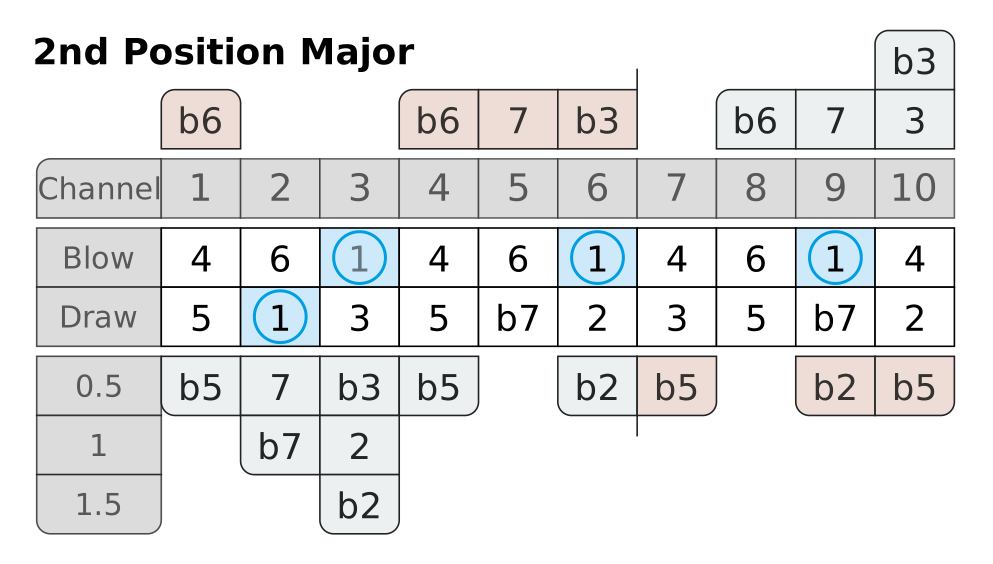
2nd Position Major on a C harmonicaEvery hole of a 10-hole diatonic C harmonica labelled with its scale degree in second position: 1 is the root, 3 the major third, 5 the fifth, b7 the flat seventh. Blow row, draw row, draw bends, blow bends, overblows and overdraws are all shown. 2nd Position Major Channel Blow Draw 0.5 1 1.5 1 2 3 4 5 6 7 8 9 10 b3 b6 b6 7 b3 b6 7 3 4 6 1 4 6 1 4 6 1 4 5 1 3 5 b7 2 3 5 b7 2 b5 7 b3 b5 b2 b5 b2 b5 b7 2 b2

Second position on a C harmonica, every hole labelled with what it does musically — bends, overblows and overdraws included.

See it in 50 seconds

One harmonica, twelve positions, every hole explained.

A short tour through the app: switching positions, reading what each hole does, loading a scale with one tap and watching the chords of a progression light up on the harp.

Why I built this

I could play the holes. I did not always know what the notes were doing.

Like a lot of players, I learned licks first. Tabs, patterns, phrases that worked.

But what about when it comes to improvising? Or if someone hands you a lead sheet? Where are the roots in the top octave? Which of these notes belongs to the IV chord, and which one is only passing through?

I could look all of that up. I could not see it. So I started drawing maps of the harmonica with the musical function written into every hole. Two years later they were an app.

Tabs and functions

Tabs tell you where to play. They do not tell you what the note is doing.

A line of second-position tab. Precise, useful, and silent about harmony.

−2  −3′  4  −4  −5  6

Those six holes are 1  b3  4  5  b7  1 — a minor pentatonic climbing from the root to the octave above it. The same six jobs turn up again higher on the harp — in other holes, and not always on the same breath.

Second-position layout of a C harmonica with only the roots coloured: draw 2, blow 3, blow 6 and blow 9.
The roots of second position, and nothing else. Blow 3 is faded because it is the same pitch as draw 2.
What you do with it

Three things the map is for.

Understand positions

All 12 positions, with a major and a minor view, on any of the 12 harmonica keys. Switch between scale degrees and real note names. The awkward part of the Richter layout — that the three octaves are not built the same — stops being abstract when you can see it.
Follow chord changes

Pick a scale degree and the map shows the root, third, fifth and seventh of that chord across the whole instrument. Step through a I–IV–V or a ii–V–I and watch which notes stay and which ones move.

Practise one thing

Hide everything except the notes you are working on — say, only the thirds and sevenths. Turn on the backing track and play the chord tones against real changes at 100 bpm, or let the app listen and tell you whether the note you just bent is actually in tune.

In the app

What is in the app

The map above is one of the app’s three views, running on a Richter harmonica. This is the rest.

  • Harps12 keys, in Richter, Natural Minor and Harmonic Minor tuning
  • PositionsAll 12, each with a major and a minor view
  • NotesBlow, draw, draw bends, blow bends, overblows and overdraws — 39 of them on a Richter harp
  • ScalesAll seven church modes plus 13 more, including both pentatonics, blues, melodic and harmonic minor, lydian dominant, phrygian dominant and altered
  • ChordsAll seven degrees of any seven-note scale, built by stacking thirds, with 16 extensions from 7 and maj7 to b9, #11 and b13
  • BorrowingModal interchange per single degree, with the seventh that comes with it
  • NamingRoman numerals or chord names; accidentals spelled from the scale, so C minor gives you Eb and not D#
  • Backing trackPiano, bass, guitar and drums over your own progression or one of 38 presets, at a fixed 100 bpm
  • Practice modeThe app listens and marks the note you are playing. You see how accurately you are hitting it
  • Yours to adjustColour and marker of every degree, five styles of hole-number row, light, dark and night themes
  • Languages21, including English, German, French, Spanish, Italian, Japanese, Chinese and Arabic
  • OfflineThe app has no internet permission at all. Nothing to sign in to, nothing sent anywhere
Straight answers

Questions this app was built to answer.

Examples use a C harmonica.

Which notes belong to the V chord?

In second position on a C harmonica the V chord is D7: D, F#, A, C. D sits on draw 1, draw 4 and draw 8. A sits on draw 6, draw 10 and the whole-step bend of draw 3. C is every blow note of holes 1, 4, 7 and 10. The major third F# is the one chord tone the harmonica will not simply hand you: it lives on the half-step bend of draw 2, the blow bend of hole 9, and the overblow on hole 5.

That one note is why bar 9 is the hard one, and it is the best reason there is to get your draw 2 bend clean.

Where is F# on a Bb harmonica?

Three places: the half-step bend of draw 6, the one-and-a-half-step bend of draw 3, and the overdraw on hole 9. The app writes it Gb rather than F#, because a Bb harmonica is spelled with flats throughout — the same note, written the way the rest of that key is written.

How do I practise one scale degree across all octaves?

Hide the rest. In the app you pick which degrees stay visible and the others go dark, so the thirds — or only the sevenths — stand alone on the layout. Then play them against the backing track and hear how differently the same job sounds low down and up top.

Can I see Dorian or Mixolydian?

Yes. All seven church modes are there, plus thirteen further scales. Choosing a scale does two things at once: notes outside it go dark, and the characteristic note — the major sixth in Dorian, the flat seventh in Mixolydian — lights up, because that one note is what the mode is for.

Which harmonica do I need for a song in E?

Depends on the position you want. First position: an E harp. Second position, the blues default: an A harp. Third position, useful for minor: a D harp. Fourth: G. Fifth: C. Each further position moves the harmonica another fifth down. The full table covers all twelve keys in all twelve positions.

Honest limits

Is this a harmonica course?

No, and it would be a poor one. Harmonica Cheatsheet does not teach embouchure, tongue blocking, how to bend, breath control, timing or your first song. It will not train your ear and it cannot hear whether your phrasing is any good.

It is a reference, and the point of a map is to stop needing it. If you are three weeks in and working on a clean single note, a teacher and a lot of listening will do more for you than this will.

Get it

One purchase. No subscription, no ads, no account.

The Harmonica Cheatsheet app icon.

Harmonica Cheatsheet for Android

One purchase covers all twelve keys, all twelve positions and all three tunings. There is no per-key upgrade and no second tier.

$6.49 one-time — £5.49 in the UK, €6.49 in Germany, and Google Play’s local equivalent everywhere else. Android 8.0 or newer.

The app asks for exactly one permission, microphone, and only if you turn on practice mode. It has no internet permission at all, which means nothing is uploaded, no account exists and nothing works differently offline.